
Download Angry Email Translator – AI‑powered Email Tone Converter
Overview
In today’s fast‑paced work environment, a single angry email can damage relationships, tarnish a professional reputation, and even jeopardize a deal. Angry Email Translator steps in as a lifesaver, offering a web‑based, AI‑driven solution that instantly transforms hostile or overly emotional messages into polite, constructive correspondence. The tool is designed for anyone who finds themselves typing a heated response—whether it’s a frustrated customer, a stressed manager, or a disgruntled colleague.
By simply pasting up to 150 characters of raw text, users receive a revised version that retains the original intent while stripping away aggressive language, profanity, and negative tone. The process takes seconds, making it ideal for quick turnarounds during heated moments. While the service is free, voluntary donations help cover hosting and continuous AI model improvements, ensuring the platform stays reliable and up‑to‑date.
Ultimately, Angry Email Translator empowers users to communicate more respectfully, fostering healthier personal and professional relationships and reducing the risk of miscommunication.
Key Features
- AI‑Driven Tone Adjustment: Advanced natural‑language processing rewrites angry sentences into courteous language without losing the core message.
- Instant Results: Translation occurs in under five seconds, perfect for time‑sensitive situations.
- Character Limit Flexibility: Supports up to 150 characters per input, covering most short‑form email snippets and quick replies.
- Free to Use: No subscription required; the service is accessible to anyone with an internet connection.
- Privacy‑First Design: All entered text is processed anonymously and not stored long‑term, ensuring user confidentiality.
- Cross‑Platform Compatibility: Works on any modern browser across Windows, macOS, Linux, Android, and iOS devices.
- Donation Support: Optional contributions keep the platform sustainable without imposing paywalls.
- User‑Friendly Interface: Simple input box, clear “Translate” button, and instantly viewable output.
How to Install and Use Angry Email Translator
Since Angry Email Translator is a cloud‑based web app, there is no traditional installation process. Users simply need a stable internet connection and a modern web browser (Chrome, Firefox, Edge, Safari, or any Chromium‑based mobile browser). Follow these three straightforward steps to get your email tone corrected:
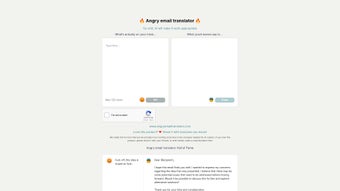
- Navigate to the website: Open your preferred browser and go to angryemailtranslator.example.com. The homepage presents a clean layout with a single text box labeled “Paste your angry email here.”
- Enter your text: Copy up to 150 characters from the original email and paste it into the box. The tool automatically counts characters, warning you if you exceed the limit.
- Click “Translate”: Press the button, and within seconds the AI generates a revised version displayed in a read‑only field beneath the original. You can copy the output and paste it directly into your email client.
For power users, the platform also offers a bookmarklet that can be added to your browser toolbar. Clicking the bookmarklet on any email drafting page automatically extracts highlighted text, sends it to the translator, and returns the polished version—all without leaving the current tab.
While no software download is required, the service is optimized for the latest HTML5 standards and JavaScript, ensuring smooth operation on both desktop and mobile browsers. Users on older browsers may experience slower response times, but the core functionality remains accessible.
Compatibility & System Requirements
Angry Email Translator runs entirely in the cloud, meaning it is compatible with any operating system that supports a modern web browser. This includes:
- Windows 10, 11, and later versions
- macOS Catalina (10.15) and newer
- Linux distributions with recent browsers (e.g., Ubuntu 20.04+, Fedora 33+)
- Android 9 (Pie) and later
- iOS 13 and later (iPhone, iPad)
Because the application is server‑side, there are no heavy local resource demands. A minimum of 512 MB RAM and a stable broadband connection (minimum 1 Mbps) are sufficient for seamless performance. The tool also respects accessibility standards, offering high‑contrast mode and screen‑reader compatibility for users with visual impairments.
Pros and Cons
Advantages
- Instant, AI‑driven tone correction saves time and reduces stress.
- Free access with optional donation model keeps the service open to everyone.
- Works on any device with a modern browser—no installation required.
- Strong focus on privacy; user data is not retained after processing.
- Simple interface makes it easy for non‑technical users.
Drawbacks
- Character limit of 150 may require multiple submissions for longer emails.
- Limited to tone conversion; does not offer full grammar or style editing.
- Reliance on internet connectivity; offline usage is not possible.
- AI may occasionally misinterpret sarcasm or nuanced context.
- Donation‑based funding means future feature expansions depend on community support.
Frequently Asked Questions
Is my email content stored after translation?
No. Angry Email Translator processes the text in memory only for the duration of the request. Once the revised version is displayed, the original input is discarded and not saved on any server logs.
Can I use the tool for longer emails?
The free version limits each submission to 150 characters. For longer messages, you can split the email into multiple sections and translate each part separately. A premium version is planned for future release.
Is the service available on mobile devices?
Yes. Because it runs in a web browser, you can access Angry Email Translator from any smartphone or tablet running Android or iOS, provided the browser supports modern JavaScript.
Do I need to create an account?
No account is required. The tool is completely anonymous, and you can start translating instantly without signing up.
How does the donation system work?
A small “Donate” button appears after each translation. Contributions are processed through a secure payment gateway, and all funds go directly toward server costs and AI model maintenance.
Final Verdict & Call to Action
Angry Email Translator fills a niche that many professional communication tools overlook: the need for rapid, on‑the‑fly tone moderation. Its AI engine is surprisingly adept at preserving the substance of a message while stripping away hostile phrasing, which can be a game‑changer for anyone who frequently drafts urgent replies. The free‑to‑use model, combined with a privacy‑first approach, makes it an attractive option for both corporate teams and individual users seeking to improve their email etiquette without investing in costly editing software. While the character limit and lack of offline capability are minor inconveniences, they are outweighed by the speed, accessibility, and positive impact on workplace relationships. If you’ve ever hit “send” on an angry email and regretted it moments later, give Angry Email Translator a try—your inbox (and your reputation) will thank you.
Click here to start translating for free and experience a calmer, more professional communication style today.



.png)



